Control4
Remotes
A dedicated remote keeps everyday TV and music controls close at hand. Halo uses physical buttons and a non-touch display; Halo Touch adds a touchscreen. Both belong to the wider Control4 system, so the room can also include compatible lighting or shade commands.
Discuss your system →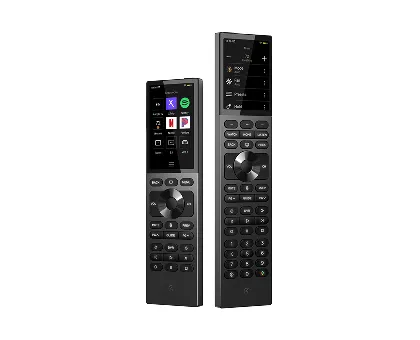
Product lines at a glance
- Halo Touch — 3.2-inch touch display
- Halo — 2.8-inch non-touch display
Range references checked against the official manufacturer page. Exact model, compatibility and availability are confirmed for the project.
Where it fits
- A living room or home theatre with several entertainment devices
- A household that wants familiar buttons instead of relying on a phone
What to check before choosing
- List the TV, sources and audio equipment in the room.
- Choose between a touch interface and a button-led layout.
Plan the right option
The ranges above help narrow the choice. If you have a specific model in mind, send its model number and the system it will join. We can check the documentation with you.
Explore related installation services →
Common questions
What is the main difference between Halo and Halo Touch?
Halo has a 2.8-inch non-touch display. Halo Touch has a 3.2-inch touch display alongside physical buttons. The best choice is the one the people using the room find comfortable.
Does buying the remote create a complete system?
The remote is an interface. A compatible Control4 system, programming and any required connections are separate parts of the design.
Manufacturer images identify the product range. Equipment selection, regional suitability and current availability require confirmation.